No products in cart
Starting operations of SteelTailor machine with Plasma cutting
- SteelTailor
- Controller and THC
- 0 comment
Q:Starting operations of SteelTailor machine with Plasma cutting
A:(1) Set up the six wire connections between the plasma and the CNC machine as per the manual.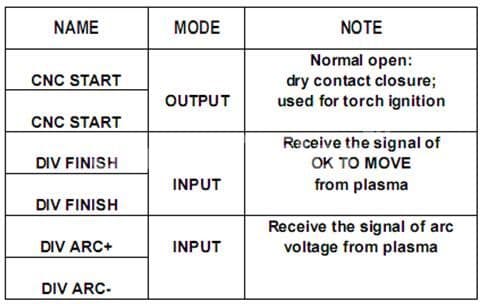
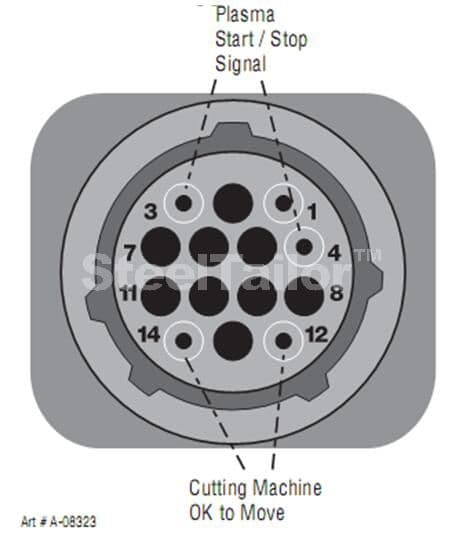
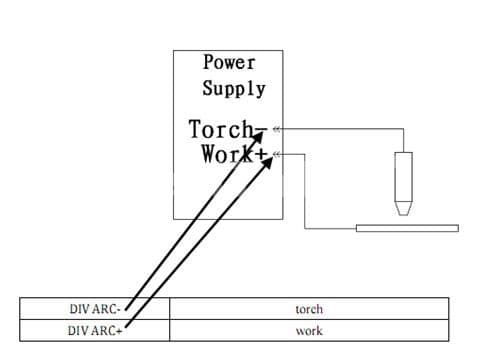
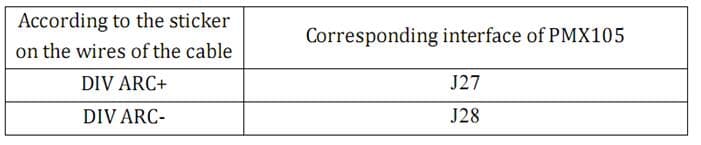
Connection J27 & J28 are inside the plasma machine. You need to open the plasma power source to give this connection.
Caution: The J27 and J28 is very high voltage pin 50 ~ 300 VDC while working so give good insulation for the connector.
(2) Place the correct parts to the Plasma torch make sure the parts you put as per the plasma machine user manual. Check if these part are with you or check the manual for alternative parts 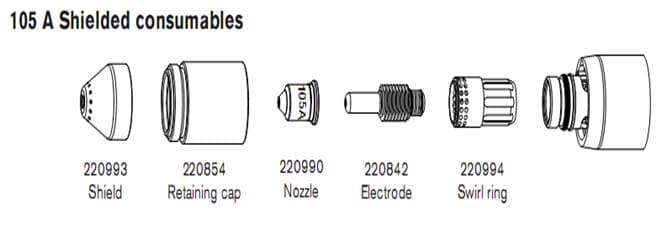
(3) Set the plasma to any one of the mode, the second option recommended consumable life.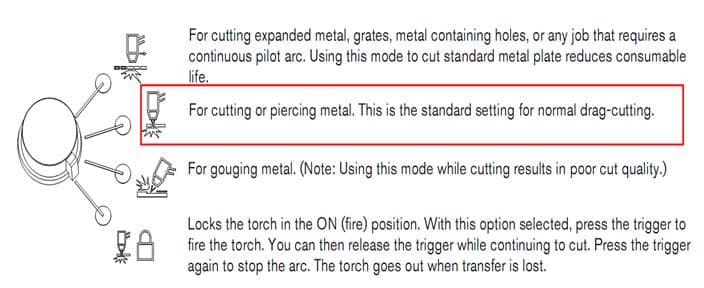
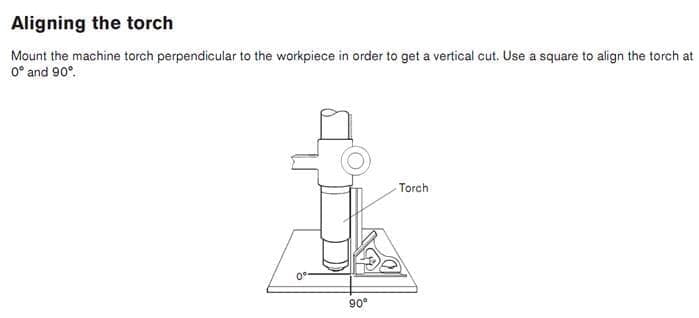
(4)
(5) Turn on the plasma machine set plasma Amps (output current) to 105 amps set the cutting speed according to the chart in the CNC machine or program. Refer the CNC manual for speed setting.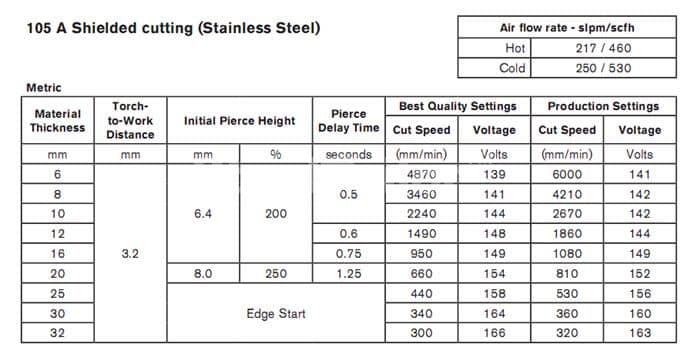
(6) How to change plasma cutting machine cutting speed?
(a) First set the maximum cutting speed in SETUP [F4]----SPEED[F1]----MACHINING SPEED set the value is mm/min in metric mode or inch/min in inch mode
(b) The value set in the MACHINING SPEED is the maximum speed at which the machine will move while cutting
(c) In AUTO mode the cutting speed can be adjusted while cutting operation by pressing 
User can increase speed to a maximum value set in SETUP[F4]----SPEED[F1]----MACHINING SPEED
(d) In AUTO mode before the cutting operation or while the cutting is paused a desired cutting speed can be entered by pressing F key on the controller. You can enter the desired cutting speed (Value should be set between 05 ~ MACHINING SPEED) after entering the value Press ENTER key.
(7) After setting the speed Make sure the CNC is in plasma mode and Pierce time
SETUP [F4] --- CTRL [F5] --- PLASMA/FLAME (1/0) set 1 for plasma.
SETUP [F4] --- PLASMA [F4] ---PIERCE TIME 0~12 (This time depend on the thickness of the material)
(8) Also set the THC according to the THC manual.
(9) After setting all this select a drawing from the LIB press ENTER and then APPLY to set the dimensions.
(10) Go to AUTO mode press Green button now the CNC should start cutting process.
(11) Cutting process:-The THC first comes down and touches the plate and moves up to a height set by you in the THC. At that point the plasma flame will get ignited and start to make a hole (Pierce) in the plate the torch wait till the pierce time is over (set in the CNC controller). The pierce time is over the CNC start moving and cut the desired shape on the plate.
Add new comment